
SaaS Buyer Q&A: What Trimble Connect Scheduling Means for Real-Time Project Schedules, Cost and Controls
Trimble Connect Scheduling is an AI-assisted construction schedule layer that links a master plan to live project signals, then proposes changes for human review. For buyers, the question is not whether the demo looks impressive. The question is whether it reduces rework, shortens decision cycles and survives integration with the scheduling tools already running jobs in North America.
Every product leader eventually hits the same fork: add one more intelligent feature to an existing platform, or create a separate workflow that teams must learn. The Trimble launch at the Trimble Dimensions User Conference suggests a different route: keep the schedule inside the platform, but give it a nervous system. The nervous system is data. It pulls from look-aheads, RFIs, weather forecasts, daily reports and submittals, then uses agentic AI to monitor changing conditions, assess risk and suggest schedule adjustments for review before they are applied.
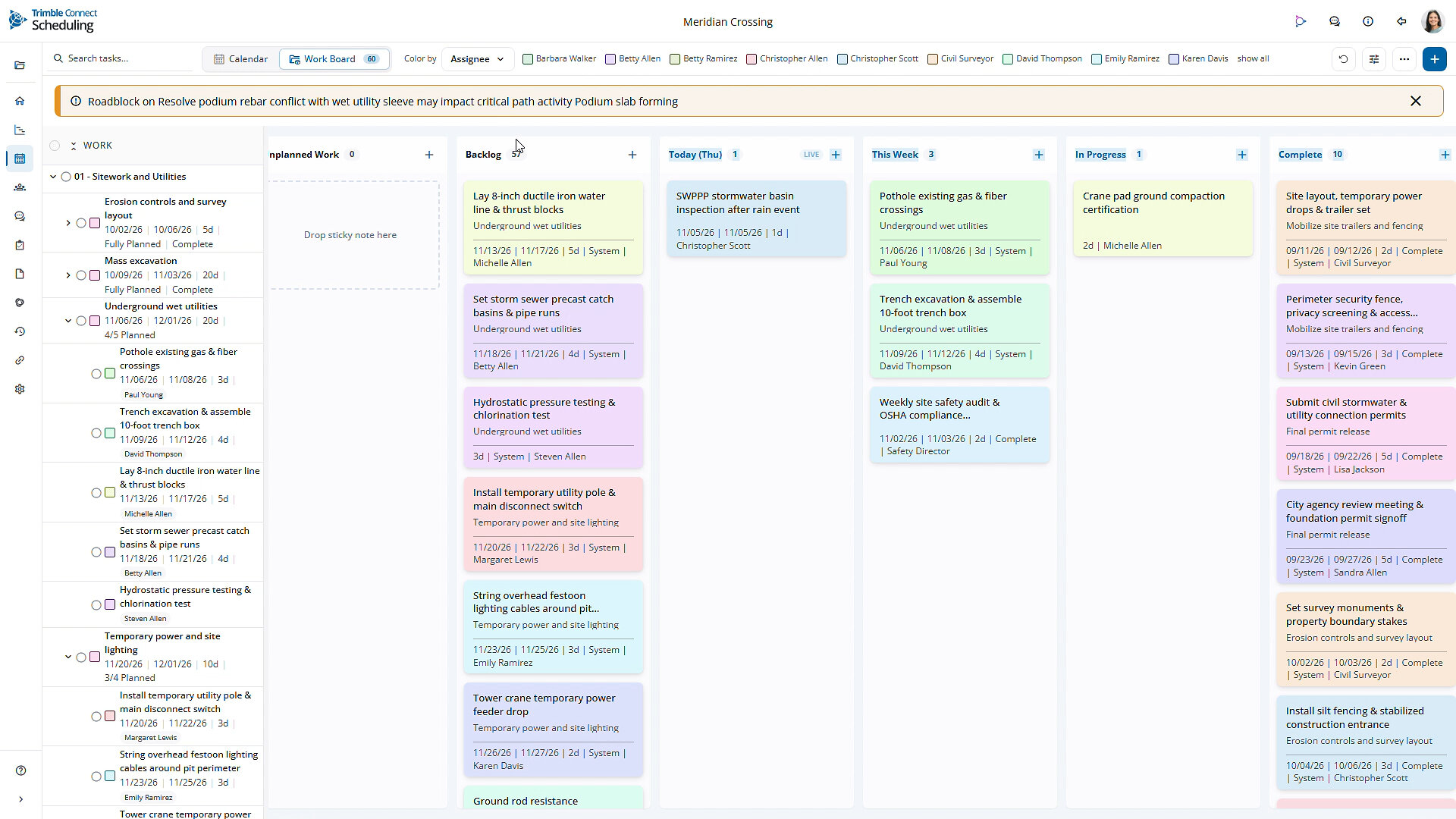
What problem does Trimble Connect Scheduling solve for schedule owners?
Short answer: fragmented truth. Construction schedules change because crew availability, late deliveries, change orders, equipment issues, weather and other disruptions do not move at the same speed. Many office and field teams still coordinate through spreadsheets, whiteboards, email and text messages. Those fragmented workflows can create version mismatches and make early risk identification harder. The new capability centralizes the schedule and connects it with live work.
On the Trimble Connect platform, the agentic planning engine in Trimble Connect Scheduling can review schedule-related information from multiple sources in real time, including Trimble Connect common data environment and Trimble Connect Project Management data. It can also compare current information with historical operational data and patterns, helping teams identify schedule risks and suggest possible responses. For a SaaS product owner, the key is not the label agentic AI. The key is whether the platform can turn scattered operational events into one accountable workflow graph.
Capabilities that matter in a pilot
- Continuous risk calculation: Data from across the Trimble Connect platform, including BCF topics, RFIs and weather data, is reviewed to assess schedule risk.
- Delay prevention: Potential schedule conflicts, such as pending RFIs or weather impacts, are identified, and adjustments such as float use or activity resequencing are suggested.
- Field and master schedule alignment: Field look-ahead tasks are linked with the master Gantt chart so jobsite work and project-level tracking stay aligned.
- Open integration or new schedule creation: Contractors can build and revise schedules in Trimble Connect Scheduling or import schedules from Primavera P6, MS Project and other tools while preserving logic and baselines.
- Field and office collaboration: Field leaders, project managers, schedulers, estimators and executives can update and review scheduling in a shared environment.
- Domain-specific model: A model trained on Trimble construction project data provides context-specific outputs.
Is the AI allowed to change a live schedule?
Based on the launch description, the practical answer is no. The engine identifies risk and proposes adjustments; the schedule changes are subject to review before they are applied. Trade coverage of the Trimble announcement reinforces the same control point: the scheduling engine can propose float and sequencing fixes, but teams must approve changes before they proceed. That distinction is important for enterprise buyers. A schedule baseline is a contractual and financial artifact, not just a visual diagram. A SaaS rollout should start with assistive intelligence, not autonomous execution.
How does Trimble Connect Scheduling fit existing planning tools?
This is the buyer question with the largest hidden risk. If a contractor already uses Primavera P6 or MS Project, the new tool is only useful if it respects planning depth, dependencies and baselines. The launch materials state that contractors can build schedules in Trimble Connect Scheduling or import schedules from Primavera P6, MS Project and other tools while preserving logic and baselines. A good pilot should compare two paths: a native schedule created in the tool, and an imported schedule with long-lead dependencies, resource constraints and historical baselines.
| Buyer question | What the launch indicates | What to test in the pilot |
|---|---|---|
| Can existing planning depth survive? | Contractors can use the scheduling module or import schedules from Primavera P6 and MS Project while preserving logic and baselines. | Import two schedules: one simple project, one with constrained dependencies. |
| Will the field trust it? | Field look-ahead tasks are linked with the master Gantt chart. | Measure accepted AI suggestions, reverted suggestions and time to action. |
| What data quality is required? | Risk calculation draws on Trimble Connect, RFIs, BCF topics, weather data and project management signals. | Audit owner, timestamp and completeness before rollout. |
| What is the pricing signal? | A North America product page lists $588 USD per user/year for Trimble Connect Scheduling. | Model seats for schedulers, project managers, superintendents and executives. |
Why the launch matters for SaaS commercialization teams
From a product and monetization perspective, this is a platform expansion play. The value is not a standalone schedule model; it is the platform surface that already holds drawings, documents, tasks, communication and project data. The launch therefore tests a common question in vertical SaaS: can a company turn adjacent workflows into higher expansion revenue without increasing onboarding friction? The answer depends on whether users adopt one source of truth. For buyers evaluating the broader platform story, our AI tools in Trimble Connect guide explains how this release fits design, build and operate workflows.
Commercialization also appears focused on a clear addressable segment. General contractors and subcontractors across construction sectors in North America can access Trimble Connect Scheduling. That is a narrow enough wedge for enterprise operations, but broad enough to matter to investors and product leaders watching construction software. The event setting also adds distribution context: the announcement arrived at the Trimble Dimensions User Conference, which Trimble describes as a November 9-11, 2026 event at The Venetian Resort Las Vegas.
Over the past several months, contractors used the system to support schedule organization and communication. For a product manager, that validation detail is more useful than a single demo clip. Field teams often reject software that is correct in theory but inconvenient at 6 a.m. on a job site. The commercial test is whether the tool prevents an expensive moment: idle crews, rework, missed milestones, change-order disputes or weather-driven sequence breaks. If the alert arrives late, or to the wrong owner, conversion and retention pressure will follow.
Who should buy now, and who should wait?
- Buy now if: your teams already standardize on Trimble Connect, your schedules come from Primavera P6 or MS Project, and your pilot can measure delay-avoidance minutes rather than feature clicks.
- Pilot carefully if: your project data exists but has inconsistent ownership, missing timestamps, or weak RFI and daily-report discipline. The AI is only as usable as the signals it sees.
- Wait if: your organization is not ready to assign accountability for proposed schedule changes. A scheduling tool without an approval chain can create false confidence.
FAQ: short answers for decision-makers
What is the product's core claim?
The core claim is that centralized, real-time visibility plus agentic AI can make construction scheduling less reactive. The schedule is not treated as a static plan; it is connected to look-aheads, RFIs, weather forecasts, daily reports and submittals.
Which teams should be in the pilot group?
Include a scheduler, a project manager, a superintendent, one estimator and one executive sponsor. The scheduler understands logic and baselines, the project manager owns the commercial consequence, the superintendent tests field usability, the estimator checks change-order sensitivity, and the executive sponsor removes cross-team friction.
What is the most useful adoption metric?
Track accepted suggestion to executed change time, not model accuracy alone. In commercial software, the buyer pays for a decision shortcut. If the suggestion is correct but requires three approvals and a manual re-entry, it may increase work instead of reducing it.
Where can I find more information?
More information is available at trimble.com, including product pages, launch materials and event details referenced in this article.
Next experiment for SaaS teams and construction buyers
The next step is not a broad rollout. Run a two-week comparison on one active project. Use the existing schedule as the baseline, enable the new scheduling module, and record every suggested risk, user approval, rejected suggestion and completed field action. Then compare the result with a control project that stays on the old workflow. The metric should not be AI novelty. The metric should be whether the shared environment shortens decision cycles, improves data hygiene and protects committed milestones.